

NOW AVAILABLE
AniTracker
Share with your friends.
Anime watches, rewatches, favorites, and collections.

Increase Engagement

Live Updates ● 3 minutes

Anilist Intergration
Track

Recommend
Watch Later
What are the features and
capabilites of this bot?
AniTracker can do anything by pulling from Anilist.co it will send activity in a beautiful little package directly to the server channel of your choice.
For example:

Notify friends when reacting to their feed

Live updates every 3 minutes from activity feeds

Works on every device connecting to Anilist

Find other people on Anilist through the server

Bring your AniList activity to Discord

Show off your favorites list and collections
Sources for Anilist integrations:
01
Stremio
Stremio is preferred for it's consistency and sleek design, you can connect to AniList via this addon.
02
Streaming Sites
Anything from Moe's list is generally available for connection to Anilist. Check settings after account creaction.
03
Browser Addons
There are a lot of options for browsers addons that track your anime directly to AniList, check here for more.
NEW UPDATES
Fresh updates weekly.
Patch notes:
08/24/2026
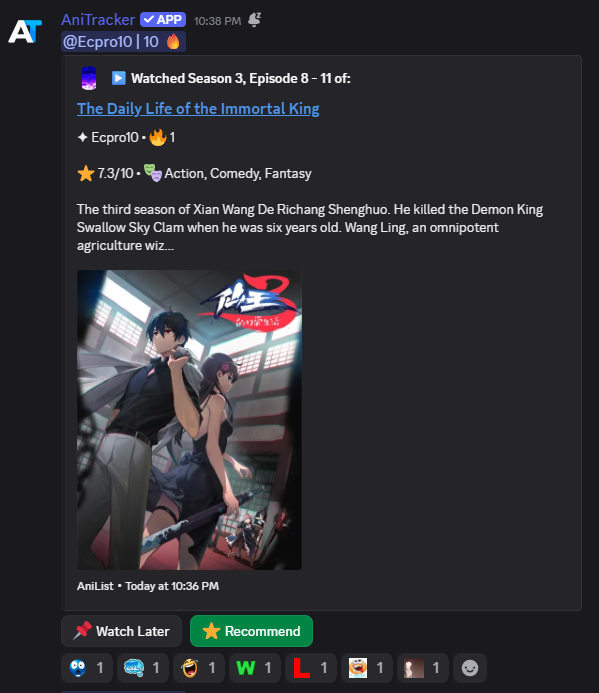
The embed got overhauled this week and brought new features like:
- Ratings & Genres
- Profile Picture display
- Silent pings for activity (Alerts now ping silently to the person referred to not annoy anyone).
- Description size limited
- Bigger and better anime image
- Seasons displayed
Com o Convertr você não precisa mais ficar fazendo essa tarefa toda vez que vai lançar uma página seja para você, para sua empresa ou para seu cliente.
Veja o que ele pode fazer por você:

Creator
Hello, I ammm
Sleep Deprived.
I really don't know what to type here, find me on discord @sleepdeprivvd
Support me 🤍Let's work together.
I am always open to improvements or ideas that you want to come alive. Let's build something amazing together and imrpove the experience of AniTracker.
Questions and Answers
Is AniTracker free?
Yes. What I've made is completely free of charges and won't bottleneck any activites you have in mind because of money. I am however open to any donations and it would signaficantlly help both AniTracker and I.
Why is AniTracker not resonding?
AniTracker fails to respond to requests and send new updates solely because of Anilist.co's API being overloaded. Their service sometimes gets slowed down therefore the bot fails take action.
What can AniTracker do?
AniTracker can display your anime activity, show detailed anime information, share your favorites, and keep your Discord server updated with activity from AniList.
Do I need to sign in with my Anilist account?
You don't have to login to Anilist at all for the tracking, all you need is an username. If you would be fine with sigining into and authorizing my bot then it would unlock new features like "Favorite", "Watch Later", "Follow user" and many more features to come to really make it a fully immersed experience all from the discord channel. You can authorize and sign in by clicking one of the special buttons, or simply run the command /signin.
AniTracker Setup Guide
Getting started:
1. Use the URL provided to invite AniTracker to your server.
2. Select (or create) the channel where you want anime/manga activity updates to appear.
3. Run/track on that channel. This performs two things at once: Begin tracking that individual's AniList activity. Sets that channel as where all future updates are posted (only has to happen once).
That's it—you're all set. Every time an AniList profile watches an episode, reads a chapter, or changes their status, it is instantly posted.
Commands:
What it does/tracks. Begin following someone’s AniList activity/untrack. Stop following them/lists. See who is monitored and which channel updates are sent to /who is tracking. Same list, but with names only, ensuring not to ping anyone/set channel. Move changes to a new channel (requires Manage Server authority) or watchlater. Privately examine your stored watch-later list (only you see the response) /recommendations. See the server's most-recommended anime/manga, ordered by vote count/favorite. Look up any AniList user's favorite anime or manga.
Note: whoever runs the track receives a silent ping (no notification sound, just a regular display) anytime that profile updates new activity, so you always know who to check in with. Reading an Activity Post. Each update displays: The tracker's AniList profile name appears on top. A large header containing the status, anime name, and an emoji—plus season/episode details on its own line when it can be worked out. A brief summary with the anime's name linked to its AniList page. Anime's Ani List rating and top genres. A wide cover picture.
Using the Buttons Each activity post has two buttons:
📌 Watch Later: save anime/manga to your own list. Click it again to delete it. /watchlater allows you to check your list at any moment.
⭐ Vote for the anime/manga (one vote per person). Click again to reverse your vote. The button displays the live vote count, and you can see the entire ranked scoreboard at /recommendanimes.
Reacting to posts When you respond to an activity post with an emoji, two things happen privately (no one else in the channel sees this): The person whose action it was receives a DM informing them who responded and with which get a DM verifying that they were alerted. This requires both users to enable DMs from server members in their Discord privacy settings; otherwise, the DM will not come for that person. A few things to know. If AniList is down or overloaded, you may notice the bot report an error on /track, or activity may cease updating for a short period of time—this is caused by AniList's servers, not the bot, and it resolves automatically. Season numbers are estimated from the anime's title text; therefore, they are typically correct but not guaranteed for all shows.
Is there any use of AI?
Yes. I would like to declare that this project is heavily assisted by Claude.
It is a great tool, and I'm very inexperienced when it comes to Discord bot development, so it has been a great help.
How often are activity updates sent?
AniTracker checks for new activity every 3 minutes and posts updates to your configured Discord channel when new activity is detected.
Can I use AniTracker in multiple servers?
Yes, you can add AniTracker to multiple Discord servers, provided you have permission to add bots to those servers.
Where can I get help?
If you experience an issue or have a question, on the AniTracker website you can submit feedback or ask for help, or you can contact me directly on discord as I'm available. Soon we will have a Discord server for assistance.